Architecture Optima Camunda Opensource
Open Source RxOptima Architecture Diagrams
Enterprise Camunda Setup:
- Green: Open source license.
- Green stripes: Source-available license (for the curious, the difference between open source and source-available is explained below, for most people, there is no real difference).
- Blue: This software is available but only free for non-production use. If you want to put these components into production, you will need to buy a license (via enterprise subscription) from Camunda.
-
Red: This software is only available within Camunda Platform 8 — SaaS and can’t be run self-managed. Note: This is subject to change, and some of the red[] components should turn blue over time.
The short summary is that you can run everything green (including green stripes) as self-managed in production without needing a license. The green components are open source, as coined by the Open Source Initiative. The striped components use a source-available license. Regarding Zeebe, this is the Zeebe Community License v1.0. It is based on the very liberal open source MIT license but with one restriction — users are not allowed to use the components for providing a commercial workflow service in the cloud. This is typically not a limitation for any of our existing customers, users, or prospects. If you want to know more about open source licensing, visit Why We Created The Zeebe Community License and Zeebe License Overview and FAQ.
Furthermore, you can run all the blue components during development and testing. This not only allows you to try them out but will help you with your development efforts. If you want to keep using them while going into production, you will need to buy a license from Camunda. Later in this blog post, I will explain how you can go live without those components, as there is a possible path.
Enterprise System Architecture:
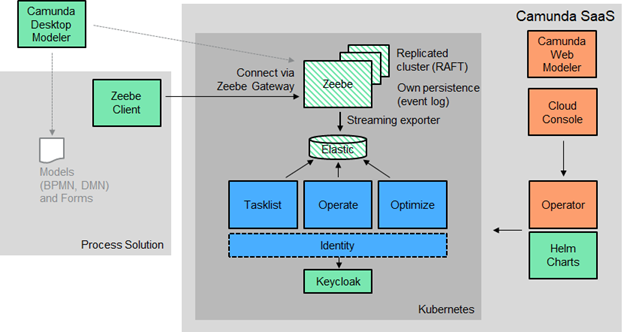
Production with source-available software
Open-Source Component with MIT License:
Let’s come back to self-managed software and sketch a path to production that neither requires a commercial license nor breaks any license agreements. For production, this basically comes down to using only the source-available parts of Camunda 8:
Optima Open-source System Architecture:
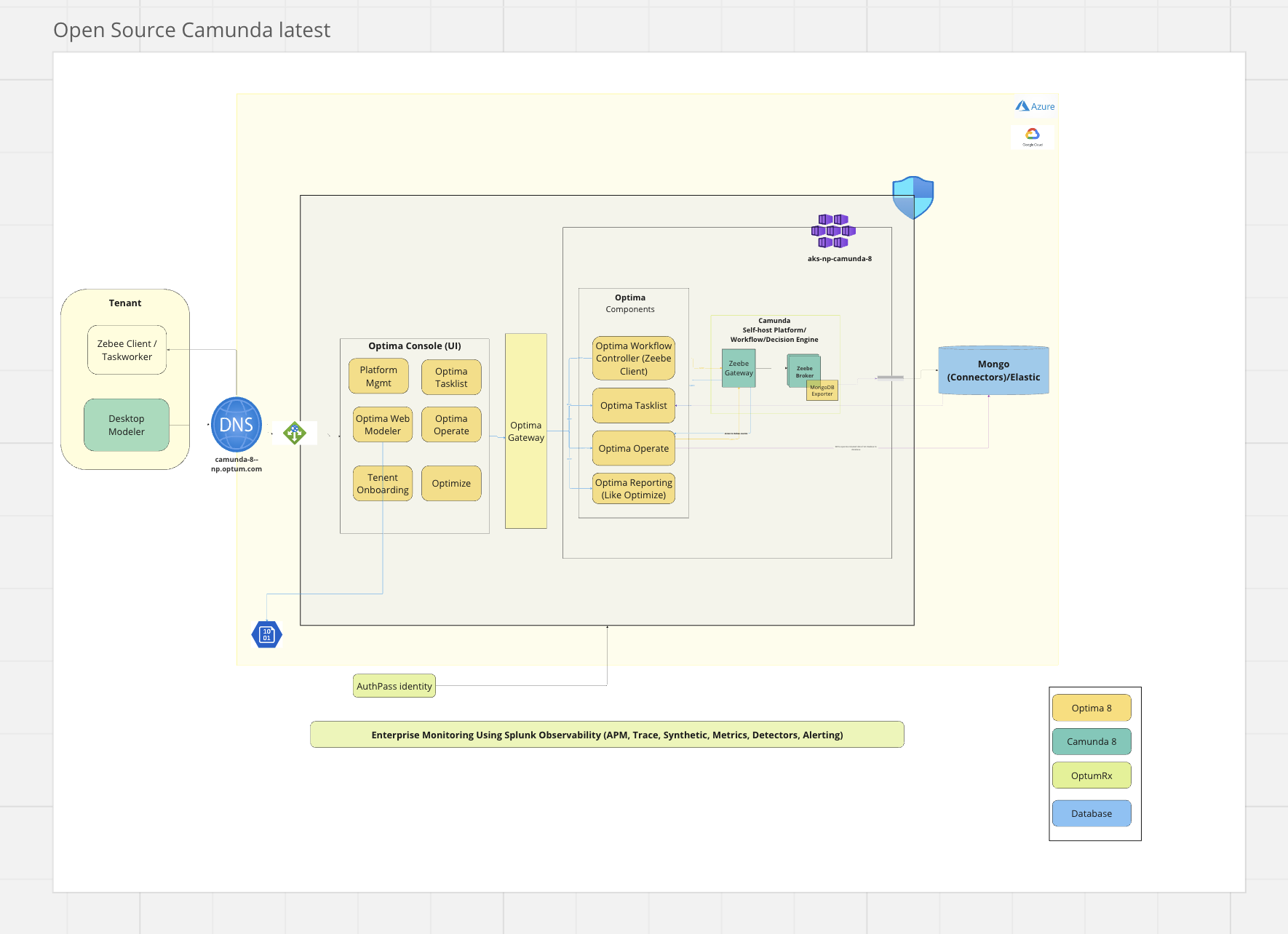
The System Architecture consists of following components:
- Optima UI(Consolidated UI for tasklist, Opearte, Optimize admin console/Platform Console)
- Optima Gateway
- Camunda Self Hosted Platform Open source
Camunda Open consists of 6 major components: - Zeebe (Zeebe Engine, Zeebe Gateway, Zeebe Clusters) From Camunda - Optima Operate - Optima Tasklist - Optima Optimize - Optima-UI - Elastic search will deploy as part of HELM deployment - Optima gateway
Consumer applications will communicate with centralized Optima Gateway using any of the Application Suite (which consists of REST APIs, Java Client Library or Maven Archetype). While internally Optima Gateway has a capability to connect with all the Camunda Components.
RxOptima Components
There are the major components/modules of Camunda:
-
Modeler Web Modeler -
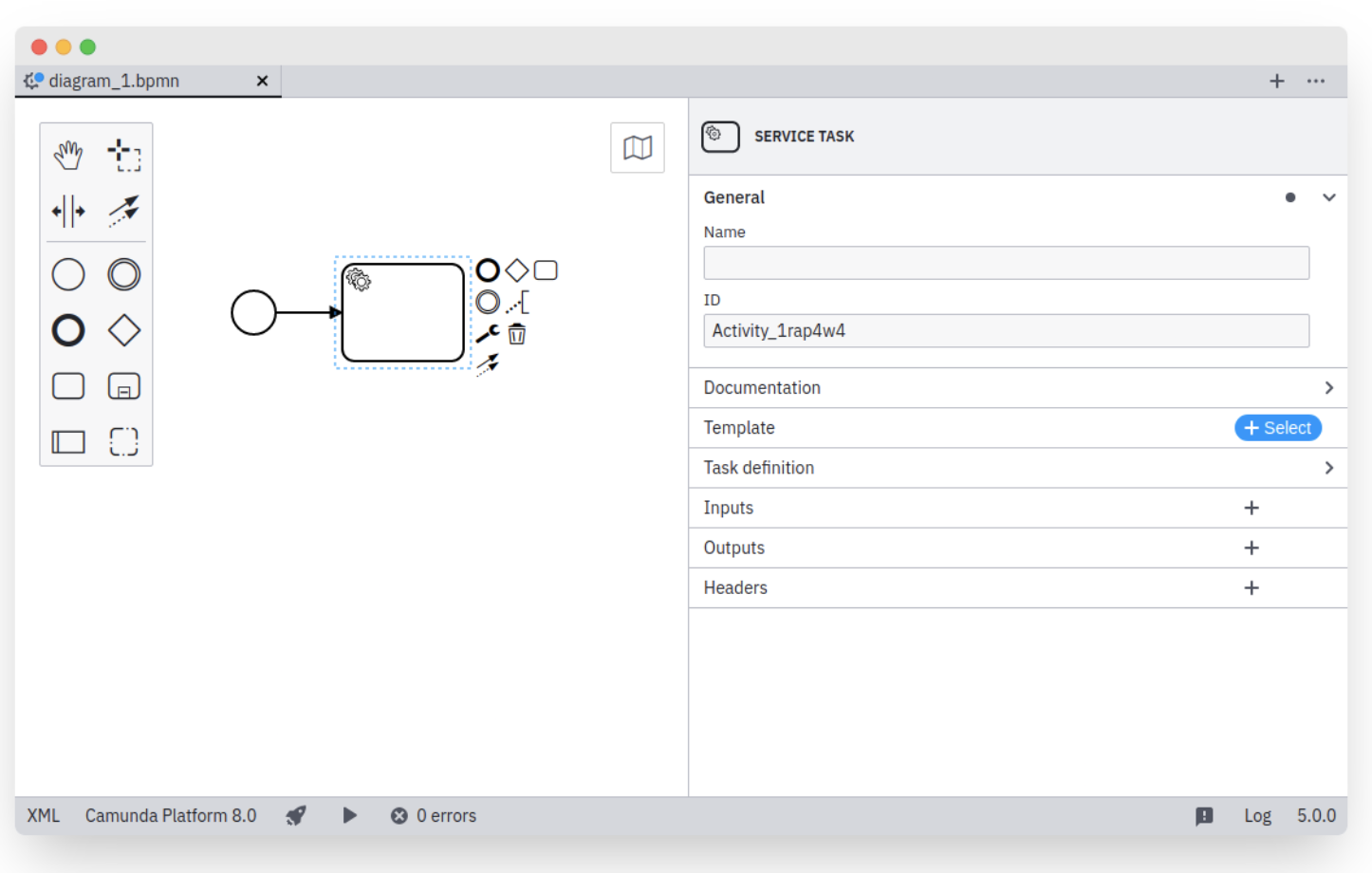
- Any executable process needs a BPMN/DMN diagram designed and configured beforehand. Camunda offers a few tools to design your diagrams and implement them: Desktop Modeler and Web Modeler.
- Desktop Modeler is a desktop application that can be installed and used locally, all while integrating your local development environment.
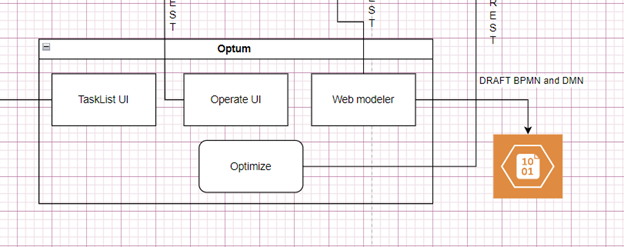
- Web Modeler will be part of OptimaFlow UI.
-
Desktop Modeler and Web Modeler differ mainly in their environment.
-
-
Zeebe -
- Zeebe is open source component as part camunda 8
- Zeebe is the process automation engine powering Camunda Platform 8.
- With Zeebe you can define processes graphically in BPMN 2.0, Build processes that react to events from Apache Kafka and other messaging platforms, Scale horizontally to handle very high throughput, and more.
- For more details on Zeebe, refer here.
-
Zeebe Gateway -
- Zeebe Gateway is open source component as part camunda 8
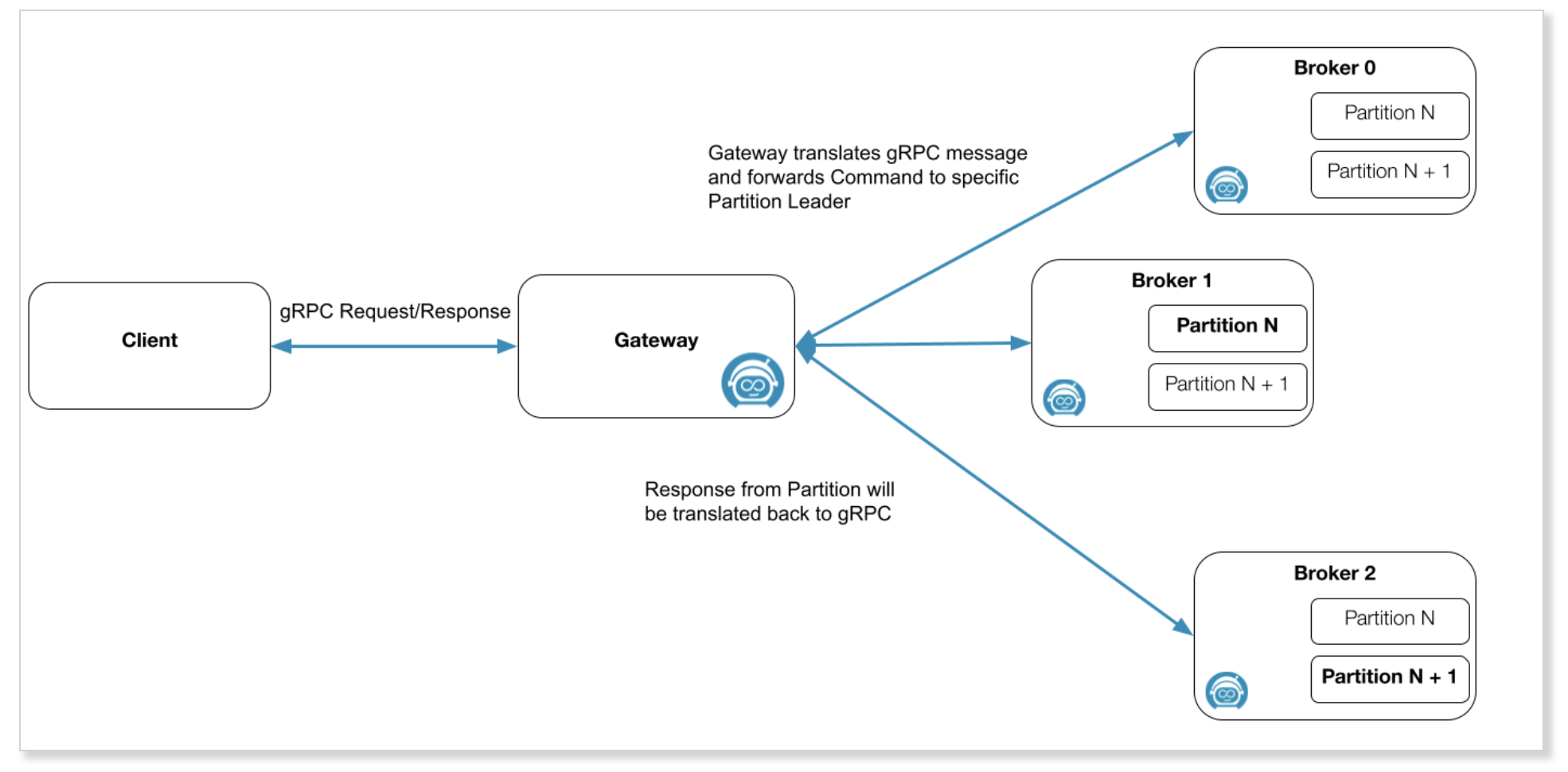
- Zeebe Gateway is a component of the Zeebe cluster.
- It can be considered the contact point for the Zeebe cluster which allows Zeebe clients to communicate with Zeebe brokers inside a Zeebe cluster.
- For more details on Zeebe Gateway, refer here.
-
Optima Operate - Operate is the component you will miss most, as you typically want to gain a clear understanding of what is going on in your workflow engine and take corrective actions. For looking at data, you can access it in Elastic (check the Elastic Exporter for details), leverage the metrics, or build your own exporters to push it to some data storage component that is convenient for you. Exporters can also filter or pre-process data on the fly. It is worth noting that the Operate data pre-processing logic backing the History API is part of Operate and not free for production use. For influencing process instances (like canceling them), you can use the existing Zeebe API, which is also exposed as the command-line tool zbctl. This flexibility allows you to hook functionality into your own front-ends. Of course, this takes effort, but it is possible, and we know of users that have done it. As already mentioned, you should contrast that effort with the costs of the license.
Design
Implementation: 1. Create spring boot application which will be connect to Elastic search/any data store like kafka/Cosmos DB 2. This Spring boot will connect to Elastic search data source, and which will be used get all process details data and Decision data will be get from the elastic search 3. Index Details: a. operate-incident b. Zeebe-record-process c. Zeebee record decision d. Zeebee record job e. Zee-record-variable f. operate list view g. Opearte decision 4. Controller/ API Details: a. Dashboard controller : To get overall stats of the process, human task and decision and deployment b. Fetch deployed process and decision c. Fetch Form details d. Get Deployment detail by process/Decision definition id and name e. Process instance details Id/ definition name f. Decision instance details by name/id g. Flow node details to get current running process by Id h. Job controller i. Incident controller j. Variable controller Optima Optimize:
-
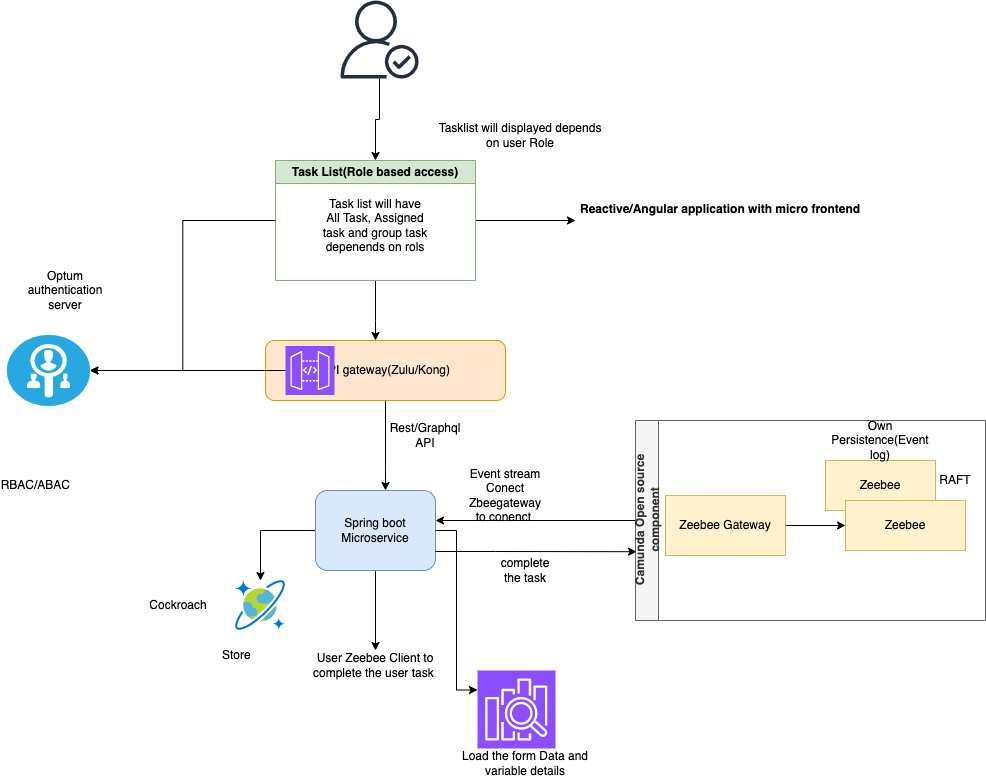
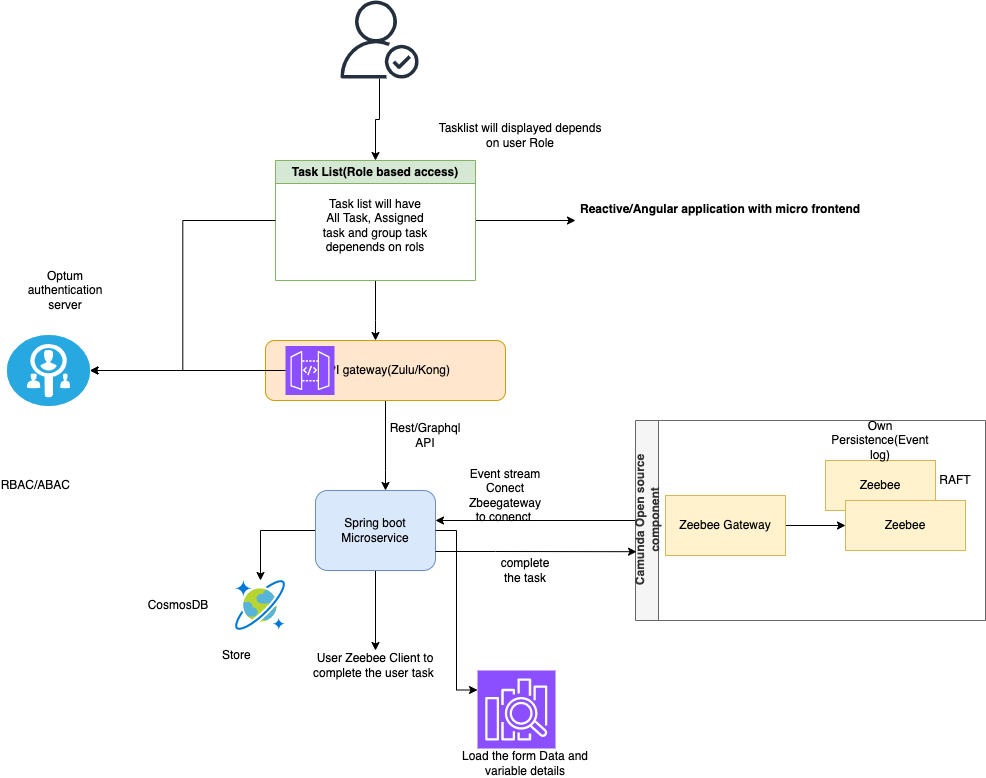
Optima Task list: - We will need to implement our own task management solution based on using workers subscribing to Zeebe as described in the docs. That also means you have to build your own persistence to allow task queries, as the Tasklist API is part of the Tasklist component and is not free for production use.
Design
Implementation: 1. Create spring boot application. 2. Subscribe to Zeebee gateway to collect all the task list event. 3. Apply the filter store the tasklist event details, which include Varibale, Assignee, group name, taskId and task name etc 4. Store all the data either Postgress or cosmos DB 5. Expose API on Cosmos / Postgres DB 6. Expose the Rest api to Perform Claim the task 7. Also Use Zeebe client to call Zeebee gateway to complete task from task list 8. Expose Bulk claim/Complete API 9. Expose API for get task by assignee/Group 10. Expose API to complete, assignee and un assignee the task. 11. Expose API to get Variable details by task Id 12. Expose API to get total number of human task to show in UI depends on tanantId 13. We also consider for multi tenancy feature for task list when we upgrage to m 8.3 14. All the API should be Authenticated with Authpass 2 15. Use existing optima Gateway to connect to the Tasklist API 16. Database design as per the task list event.
-
Optimize -
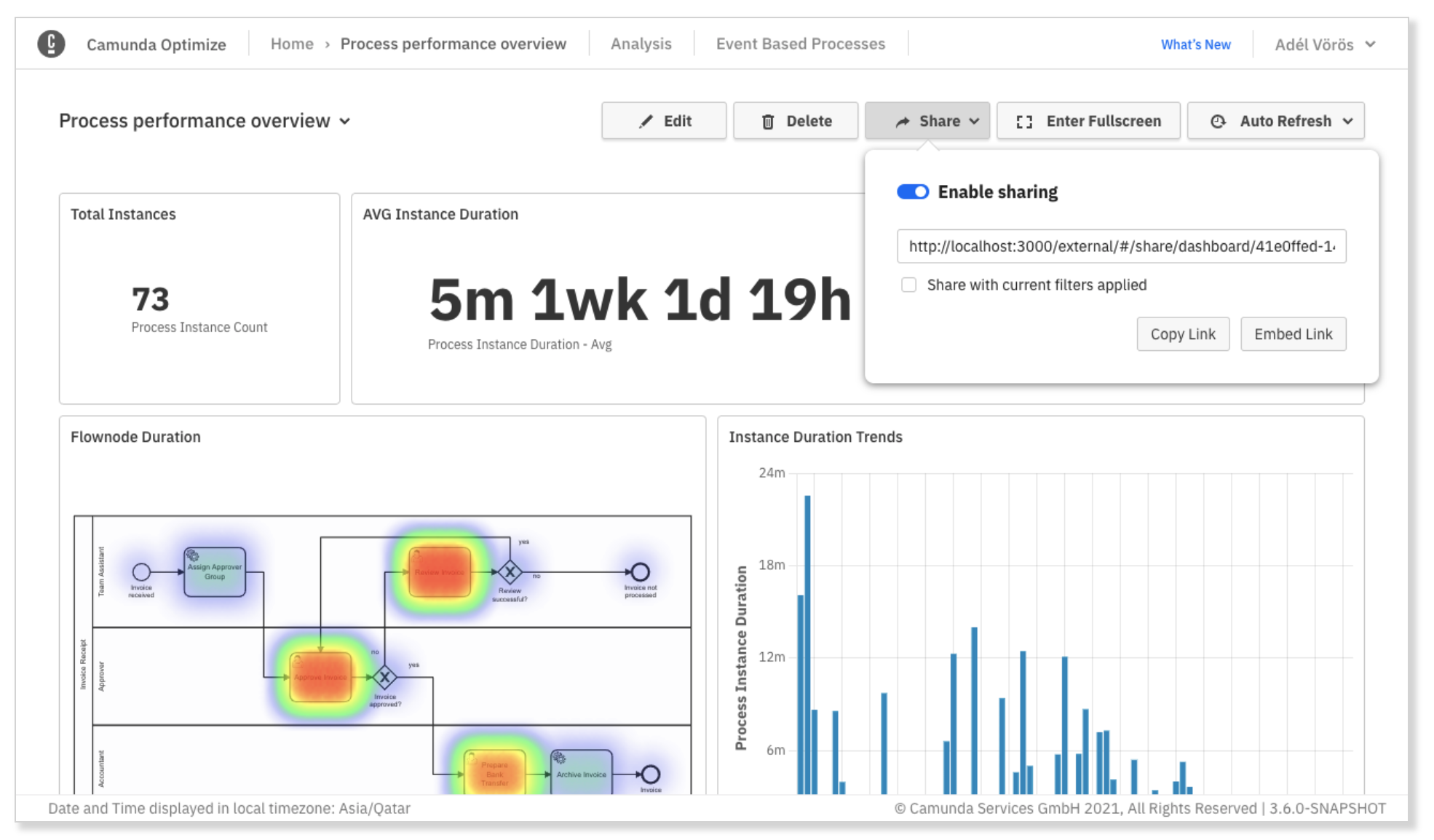
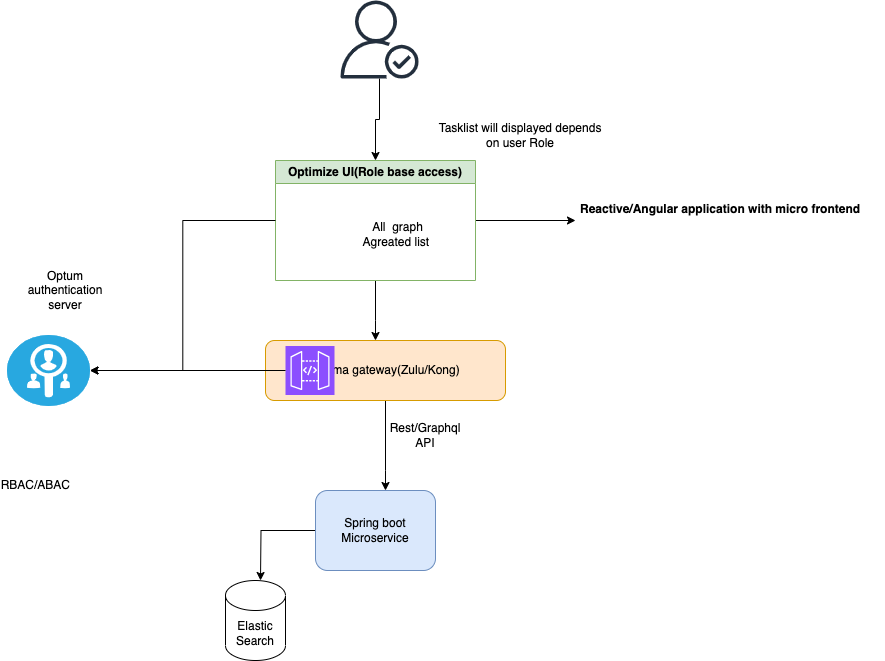
- Optimize is used to improve your business processes by identifying constraints in your model/system.
- By leveraging the data collected during process execution, users can collaboratively access reports, share process intelligence, analyze bottlenecks, and examine areas in business processes for improvement.
Design
-
Workflow Controller service - Workflow Controller is mainly for controlling all the activity related to Zeebee and Zeebee Gateway. When user want start the process or decision, Deployment workflow, Cancel the process, retry incident and Modify Process etc. This microservice will be connect to the Zeebee gateway with Zeebee client which will take handling all the process related operations.
Design
-
Optima Flow UI - Flow UI have aggregate View of Dashboard where we can see number of process decision open human task and deployment details.
Depends on user role user can see the admin console, Tasklist, operate and optimize and tenant console. UI will be connected to authpass to get the role from token and it will provide specific UI access depends on the user role and same data can be send to backend to get the data depends on tenant and user details
-
Azure Blob Storage -
It wrapper API service which will connect to azure blob service store all DRAF BPMN and DMN Data and will have GET API to continue the Workflow design. This service will have API with Role base access only specific person can save the BPMN in the Azure blob storage. This will be used by Web Modeler to Save the BPMN and DMN to Azure Blob storage.
### Design
- 
Authorization
- AuthPass -
DataSource:
- Elastic Search -
- Postgres -
- CosmosDB -
References
- Modeler - https://docs.camunda.io/docs/components/modeler/about-modeler/
- Identity - https://docs.camunda.io/docs/self-managed/identity/what-is-identity/
- Zeebe - https://docs.camunda.io/docs/components/zeebe/zeebe-overview/
- Zeebe Gateway - https://docs.camunda.io/docs/self-managed/zeebe-gateway-deployment/zeebe-gateway/
- Operate - https://docs.camunda.io/docs/components/operate/operate-introduction/
- Tasklist - https://docs.camunda.io/docs/components/tasklist/introduction-to-tasklist/
- Optimize - https://docs.camunda.io/optimize/components/what-is-optimize/