Ness logging in Optima
Introduction to Ness
Ness logging is a solution that helps track and monitor security events across different products and applications within your organization. It provides a centralized platform for collecting, storing, and analyzing log data, allowing you to gain better visibility into the activities of your various applications and identify potential security threats.
With Ness logging, you can effectively monitor user authentication and authorization events, system configuration changes, data access and modification events, application errors and exceptions, as well as security-related events like failed login attempts and potential attacks. By capturing and analyzing these auditable events, you can improve troubleshooting, ensure compliance, and strengthen overall security measures for your different products and applications.
Ness logging also enables proactive monitoring and threat detection, allowing you to identify abnormal patterns and suspicious activities in real-time. This empowers your security teams to respond quickly and efficiently to potential threats, minimizing the impact of security incidents and reducing the risk of data breaches across your organization's various products and applications.
Auditable Events
Ness logging provides the capability to track and monitor various auditable events across different products and applications within your organization. These events include:
- User authentication and authorization events
- System configuration changes
- Data access and modification events
- Application errors and exceptions
- Security-related events such as failed login attempts and potential attacks
For full list of events please check Ness Auditable Events
These auditable events provide valuable insights into system activities and help in troubleshooting, compliance, and security monitoring.
Different Components in Optima
The Optima platform consists of different components, some of which are developed internally and others that are sourced from vendors as open-source components. Below is a table that describes the different components and their sources:
| Vendor Components | Internal Components |
|---|---|
| Camunda Operate | Optima Gateway |
| Camunda Optimize | Optima Admin Console |
| Camunda Tasklist | Optima Config Server |
| Camunda Optimize | Optima UI Console |
| Camunda Zeebe/Zeebe Gateway | |
| Camunda Identity | |
| Camunda Connectors | |
| Camunda Web Modeler | |
| Keycloak | |
| Elasticsearch |
Implementing Ness Logging in Internal Components
Applications wants to log their events can find the suitable package or library in Ness Official Page.
To log optima events in ness, we are using Azure Event Hubs Library. Sample implementaion can be found here
To implement Ness logging in the internal self-built components, follow these steps:
Step 1: Include the dependency in your pom.xml
<!-- ness-logger dependencies -->
<dependency>
   <groupId>com.optum.eis.kraken</groupId>
   <artifactId>ness-logger-event-hubs</artifactId>
   <version>${ness-logger-event-hubs.version}</version>
   <exclusions>
      <exclusion>
         <artifactId>resilience4j-circuitbreaker</artifactId>
         <groupId>io.github.resilience4j</groupId>
      </exclusion>
   </exclusions>
</dependency>
<dependency>
   <groupId>com.optum.eis.kraken</groupId>
   <artifactId>ness-logger-core</artifactId>
   <version>${ness-logger-core.version}</version>
</dependency>
**Always make sure you are using the most up-to-date version of the package. Go here
Step 2: Build a NessLoggerService which can publish event to Azure event hub.
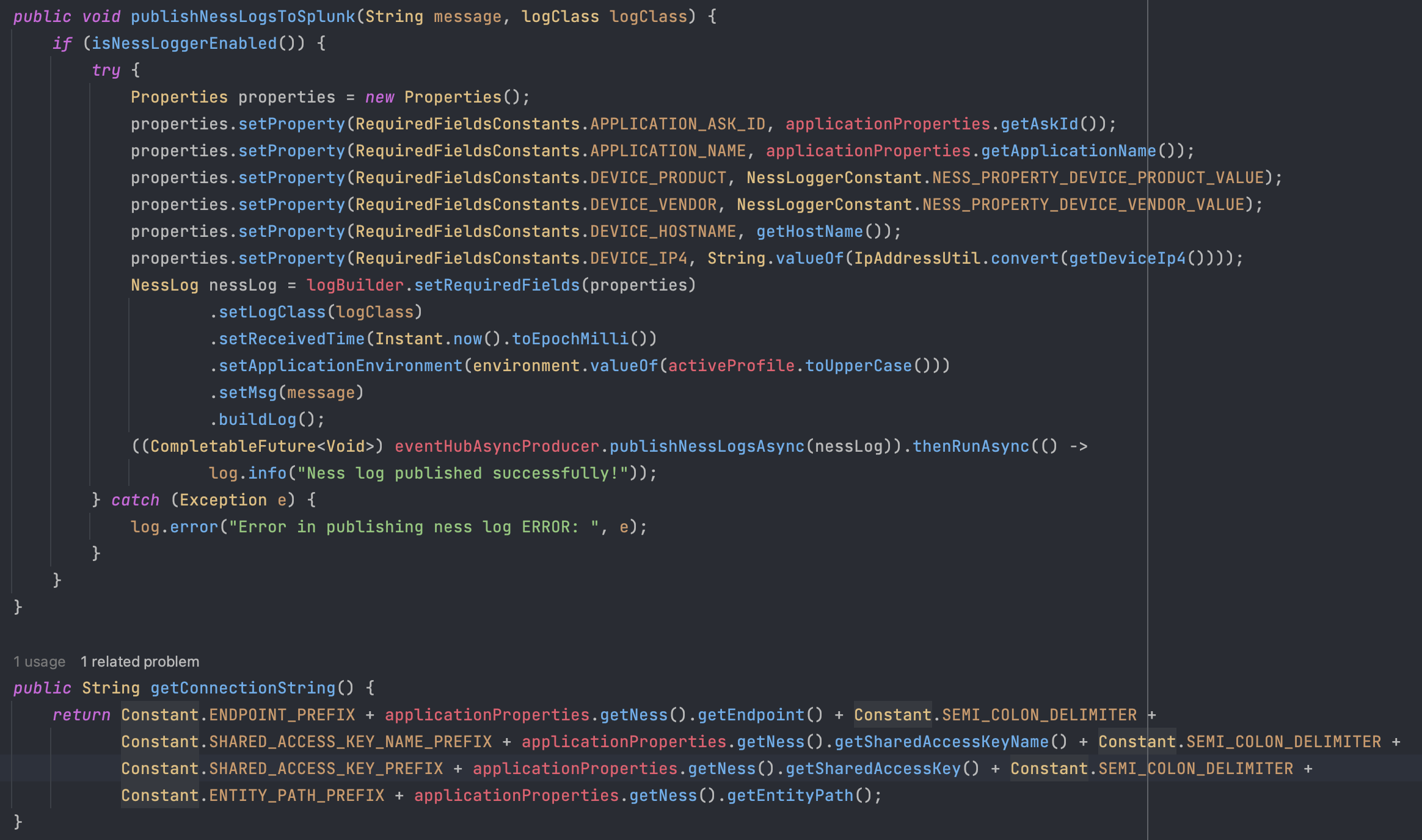
Step 3: Publish event using NessLoggerService

Implementing Ness Logging in Vendor Components
To implement Ness logging in the vendor components, which are open-source, follow these steps:
- Review the documentation and available APIs of the vendor components to understand the logging capabilities they provide.
- Identify the relevant events that need to be logged within the vendor components.
- Utilize the logging capabilities provided by the vendor components to capture and log the identified events.
- Ensure that the necessary event details are included in the log entries.
- Configure the Ness logging framework to collect and store the log data generated by the vendor components.
- Test the implementation to ensure that the events are being properly captured and logged by the Ness logging framework.
Sample Implementaion in Keycloack
Note
Official Keycloak Documentation for GELF Logging here.
Enabling Ness Logging in keycloak involves following steps:
- Enable GELF Logging in Keycloak.
- Configure FluentBit.
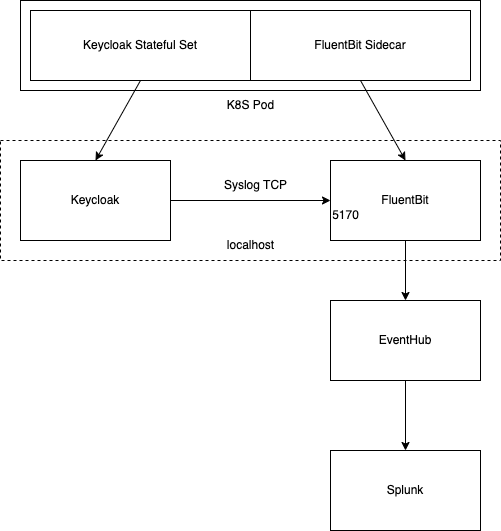
Definition of GELF: Keycloak can send logs to a centralized log management system such as the following:
- Graylog
- Logstash, inside the Elasticsearch, Logstash, Kibana (ELK) logging stack
- Fluentd, inside the Elasticsearch, Fluentd, Kibana (EFK) logging stack
Note
Since running Fluentd as non root user is challenging, we will use FluentBit.
1. Enable GELF Logging in Keycloak.
GELF Logging can be enabled and controlled by using the following environment variables.
| S.No. | Environment Variable | Value | Explaination |
|---|---|---|---|
| 1. | KC_LOG | console,gelf | This will allow printing the logs on console as well as send it to remote host using GELF settings. |
| 2. | KC_LOG_GELF_HOST | tcp:localhost | Define the remote host address and the protocol to send the log. By default, UDP will be choosen. |
| 3. | KC_LOG_GELF_PORT | 5170 | The destionation port for sending the logs. |
| 4. | KC_LOG_GELF_MAX_MESSAGE_SIZE | 16384 | Default value is 8Bytes, after which the logs will be broken in multiple lines. This setting will increase the length of the log that can be sent at once. |
| 5. | KEYCLOAK_LOG_CONSOLE_OUTPUT | json | Enables JSON logging for Keycloak. |
| 6. | KC_LOG_GELF_LEVEL | TRACE | Define the logging level for which the GELF logging will take place. |
| 7. | KC_LOG_LEVEL | WARN,org.keycloak.events:TRACE | Enabling the Keycloak events, that need to be sent as Security Logs. |
These values needed to be added in the deployment file.
        - name: KC_LOG
          value: console,gelf
        - name: KC_LOG_GELF_HOST
          value: tcp:localhost
        - name: KC_LOG_GELF_PORT
          value: '5170'
        - name: KC_LOG_GELF_MAX_MESSAGE_SIZE
          value: '16384'
        - name: KEYCLOAK_LOG_CONSOLE_OUTPUT
          value: json
        - name: KC_LOG_GELF_LEVEL
          value: TRACE
        - name: KC_LOG_LEVEL
          value: WARN,org.keycloak.events:TRACE
2. Configure FluentBit.
FluentBit have a special configuration file. Explaination is given in comments. Remove comments while using the configuraiton.
# Starts FluentBit in foreground and creates a server on port 2020 for healthchecks. Defines the Parsers file location. We can define multiple parsers but those need to be defined in separate file.
[SERVICE]
    Flush           5
    Daemon          off
    Log_Level       info
    HTTP_Server     On
    HTTP_Listen     0.0.0.0
    HTTP_PORT       2020
    Parsers_File    /fluent-bit/etc/fluent-bit-parsers.conf

# Initiates a Syslog TCP listener at port 5170 and utilize a JSON parser.
[INPUT]
    Name     syslog
    Listen   0.0.0.0
    Port     5170
    Mode     tcp
    Parser   json

# We discard any log that is not related to security event.
[FILTER]
    name   grep
    match  *
    Regex _LoggerName org.keycloak.events

# Nesslogging requires a particular format of log to be sent to Eventhub/Kafka. We do it in 3 stage process.
# 1. Create and add dummy variables starting with application.<Property> and assign the expected value to it. Similarly for device.<Property>.
[FILTER]
    Name record_modifier
    Match *
    Record agg ness
    Record type applogs
    Record application.askId AIDE_0075957
    Record application.environment DEV
    Record application.name keycloak-dev
    Record device.hostname ${NODE_NAME}
    Record device.product ness-logger-event-hubs
    Record device.vendor Optum

# 2. Feed the above value to custom script, that takes the Client IP out of the log value using String Operations in Lua and assign that ip to device.ip4 .
[FILTER]
    Name lua
    Match *
    script /fluent-bit/scripts/ip-multiply.lua
    call    filter

# 3a. Finally using nest we create nested JSON object by lifting the values using Wildcard (*) and moving it under the key application.
[FILTER]
    Name nest
    Match *
    Operation nest
    Wildcard application.*
    Nest_under application
    Remove_prefix application.

# 3b. Similarly using nest we create nested JSON object by lifting the values using Wildcard (*) and moving it under the key device.
[FILTER]
    Name nest
    Match *
    Operation nest
    Wildcard device.*
    Nest_under device
    Remove_prefix device.

# Using kafka plugin we connect with the eventhub and push the event to it. Following details can be acieved by viewing the application-logs under Eventhub on Azure. You will require the connection string from there of the format Endpoint=sb://<**Eventhub**>.servicebus.windows.net/;SharedAccessKeyName=<**Rule**>;SharedAccessKey=<**Secret**>;EntityPath=application-logs
[OUTPUT]
    Name        kafka
    Match       *
    brokers     <**Eventhub**>.servicebus.windows.net:9093
    topics      application-logs
    rdkafka.receive.message.max.bytes 2147483647
    rdkafka.fetch.max.bytes     2147483135
    rdkafka.security.protocol   sasl_ssl
    rdkafka.broker.version.fallback     0.9.0
    rdkafka.sasl.username       $ConnectionString
    rdkafka.sasl.password       ${EVENTHUB_CONNECTION_STRING}
    rdkafka.sasl.mechanism      PLAIN

[OUTPUT]
    Name        stdout
    Match       *
A lua script is used for parsing and adding the client IP address to the log. Utilized in above configuration at step 2 of filters.
function filter(tag, timestamp, record)
local pattern = "ipAddress=([%d%.]+)"
i, j = string.find(record["full_message"], pattern)
if i then
local ip_from_env = string.sub(record["full_message"], i+10, j)
local ip_parts = {}
-- Split IP address into parts
for part in string.gmatch(ip_from_env, "[^.]+") do
table.insert(ip_parts, tonumber(part))
end
-- Calculate the new value
local multiplied_value = ip_parts[1] * 256^3 + ip_parts[2] * 256^2 + ip_parts[3] * 256 + ip_parts[4]
-- Set the new value to a key
record["device.ip4"] = multiplied_value
end
return 1, timestamp, record
end
Deployment Suggestion for FluentBit
Deploy FluentBit as a sidecar to Keycloak. 1. Deploy the FluentBit Configmaps.
apiVersion: v1
kind: ConfigMap
metadata:
name: camunda-platform-keycloak-fluentbit-config
namespace: optima-84
data:
fluent-bit-parsers.conf: |
[PARSER]
    Name   json
    Format json
    Time_Key time
    Time_Format %d/%b/%Y:%H:%M:%S %z
fluent-bit.conf: |
[SERVICE]
Flush 5
Daemon off
Log_Level info
HTTP_Server On
HTTP_Listen 0.0.0.0
HTTP_PORT 2020
Parsers_File /fluent-bit/etc/fluent-bit-parsers.conf
[INPUT]
Name syslog
Listen 0.0.0.0
Port 5170
Mode tcp
Parser json
[FILTER]
name grep
match *
Regex _LoggerName org.keycloak.events
[FILTER]
Name record_modifier
Match *
Record agg ness
Record type applogs
Record application.askId AIDE_0075957
Record application.environment DEV
Record application.name keycloak-dev
Record device.hostname ${NODE_NAME}
Record device.product ness-logger-event-hubs
Record device.vendor Optum
[FILTER]
Name lua
Match *
script /fluent-bit/scripts/ip-multiply.lua
call filter
[FILTER]
Name nest
Match *
Operation nest
Wildcard application.*
Nest_under application
Remove_prefix application.
[FILTER]
Name nest
Match *
Operation nest
Wildcard device.*
Nest_under device
Remove_prefix device.
[OUTPUT]
Name kafka
Match *
brokers lp-cl-centralus-eventhub-43b3ffba.servicebus.windows.net:9093
topics application-logs
rdkafka.receive.message.max.bytes 2147483647
rdkafka.fetch.max.bytes 2147483135
rdkafka.security.protocol sasl_ssl
rdkafka.broker.version.fallback 0.9.0
rdkafka.sasl.username $ConnectionString
rdkafka.sasl.password ${EVENTHUB_CONNECTION_STRING}
rdkafka.sasl.mechanism PLAIN
[OUTPUT]
Name stdout
Match *
ip-multiply.lua: |-
function filter(tag, timestamp, record)
    local pattern = "ipAddress=([%d%.]+)"
    i, j = string.find(record["full_message"], pattern)
    if i then
      local ip_from_env = string.sub(record["full_message"], i+10, j)
      local ip_parts = {}

      -- Split IP address into parts
      for part in string.gmatch(ip_from_env, "[^.]+") do
          table.insert(ip_parts, tonumber(part))
      end

      -- Calculate the new value
      local multiplied_value = ip_parts[1] * 256^3 + ip_parts[2] * 256^2 + ip_parts[3] * 256 + ip_parts[4]

      -- Set the new value to a key
      record["device.ip4"] = multiplied_value
    end
    return 1, timestamp, record
end
binaryData: {}
- Mount the Config Maps to the Pod.
        - name: fluent-config
          configMap:
            name: camunda-platform-keycloak-fluentbit-config
            defaultMode: 420
        - name: fluent-tmp
          emptyDir:
            sizeLimit: 10Mi
apiVersion: v1
kind: Secret
metadata:
  name: camunda-platform-keycloak-fluentbit-eventhub-secret
  namespace: optima-84
type: Opaque
data:
  EVENTHUB_CONNECTION_STRING: <--BASE64EncodedEventHubConnectionString-->
- Under spec.template.spec.containers add fluentbit container and mount above configmap and assign the Eventhub connection String as secret.
        - name: fluentbit
          image: cr.fluentbit.io/fluent/fluent-bit
          env:
            - name: NODE_NAME
              valueFrom:
                fieldRef:
                  apiVersion: v1
                  fieldPath: spec.nodeName
            - name: EVENTHUB_CONNECTION_STRING
              valueFrom:
                secretKeyRef:
                  name: camunda-platform-keycloak-fluentbit-eventhub-secret
                  key: EVENTHUB_CONNECTION_STRING
          resources: {} # Add Resources based on Requirement
          volumeMounts:
            - name: fluent-config
              mountPath: /fluent-bit/etc/fluent-bit.conf
              subPath: fluent-bit.conf
            - name: fluent-config
              mountPath: /fluent-bit/etc/fluent-bit-parsers.conf
              subPath: fluent-bit-parsers.conf
            - name: fluent-tmp
              mountPath: /tmp
            - name: fluent-ipmultiply-lua
              mountPath: /fluent-bit/scripts/ip-multiply.lua
              subPath: ip-multiply.lua
          livenessProbe:
            httpGet:
              path: /api/v1/health
              port: 2020
              scheme: HTTP
            initialDelaySeconds: 10
            timeoutSeconds: 5
            periodSeconds: 1
            successThreshold: 1
            failureThreshold: 3
          readinessProbe:
            httpGet:
              path: /api/v1/health
              port: 2020
              scheme: HTTP
            initialDelaySeconds: 10
            timeoutSeconds: 1
            periodSeconds: 5
            successThreshold: 1
            failureThreshold: 3
          terminationMessagePath: /dev/termination-log
          terminationMessagePolicy: File
          imagePullPolicy: IfNotPresent
          securityContext:
            capabilities:
              drop:
                - ALL
            runAsUser: 1000
            runAsNonRoot: true
            readOnlyRootFilesystem: false
Bitnami Keycloak
Add Secret
apiVersion: v1
kind: Secret
metadata:
  name: keycloak-fluentbit-eventhub-secret
  namespace: optima-test
data:
  EVENTHUB_CONNECTION_STRING: <--Base 64 Encoded-->
type: Opaque
Add Configmap
apiVersion: v1
kind: ConfigMap
metadata:
  name: keycloak-env-vars
  namespace: optima-test
data:
  # Old Env Variables as it is - only overridden and new values are written here
  KC_LOG: console,gelf
  KC_LOG_GELF_HOST: tcp:localhost
  KC_LOG_GELF_LEVEL: TRACE
  KC_LOG_GELF_MAX_MESSAGE_SIZE: '16384'
  KC_LOG_GELF_PORT: '5170'
  KC_LOG_LEVEL: WARN,org.keycloak.events:TRACE
  KEYCLOAK_LOG_CONSOLE_OUTPUT: json
  KEYCLOAK_LOG_OUTPUT: default
Add fluent config
apiVersion: v1
kind: ConfigMap
metadata:
  name: keycloak-fluentbit-config
  namespace: optima-test
data:
  fluent-bit-parsers.conf: |
    [PARSER]
        Name   json
        Format json
        Time_Key time
        Time_Format %d/%b/%Y:%H:%M:%S %z
  fluent-bit.conf: |
    [SERVICE]
        Flush           5
        Daemon          off
        Log_Level       info
        HTTP_Server     On
        HTTP_Listen     0.0.0.0
        HTTP_PORT       2020
        Parsers_File /fluent-bit/etc/fluent-bit-parsers.conf

    [INPUT]
        Name     syslog
        Listen   0.0.0.0
        Port     5170
        Mode     tcp
        Parser   json

    [FILTER]
        name   grep
        match  *
        Regex _LoggerName org.keycloak.events

    [FILTER]
        Name record_modifier
        Match *
        Record agg ness
        Record application.askId AIDE_0075957
        Record application.environment TEST
        Record application.name keycloak-test
        Record device.hostname ${NODE_NAME}
        Record device.product ness-logger-event-hubs
        Record device.vendor Optum

    [FILTER]
        Name modify
        Match *
        Rename full_message msg
        Remove _SourceSimpleClassName
        Remove _SourceClassName
        Remove _Time
        Remove _Thread
        Remove _SourceMethodName
        Remove host
        Remove short_message
        Remove level
        Remove version
        Remove _Severity
        Remove facility
        Remove _LoggerName

    [FILTER]
        Name lua
        Match *
        script /fluent-bit/scripts/filter-script.lua
        call    filter

    [FILTER]
        Name nest
        Match *
        Operation nest
        Wildcard application.*
        Nest_under application
        Remove_prefix application.

    [FILTER]
        Name nest
        Match *
        Operation nest
        Wildcard device.*
        Nest_under device
        Remove_prefix device.

    [OUTPUT]
        Name        kafka
        Match       *
        brokers     ${EVENTHUB_BROKER_URL}
        topics      application-logs
        rdkafka.receive.message.max.bytes 2147483647
        rdkafka.fetch.max.bytes     2147483135
        rdkafka.security.protocol   sasl_ssl
        rdkafka.broker.version.fallback     0.9.0
        rdkafka.sasl.username       $ConnectionString
        rdkafka.sasl.password       ${EVENTHUB_CONNECTION_STRING}
        rdkafka.sasl.mechanism      PLAIN

    [OUTPUT]
        Name        stdout
        Match       *
  filter-script.lua: |-
    function filter(tag, timestamp, record)
        local pattern = "ipAddress=([%d%.]+)"
        local type_pattern = "type=([%a%._]+)"
        local concatenated_security_success = ' AUTHREQID_TO_TOKEN CLIENT_INITIATED_ACCOUNT_LINKING CODE_TO_TOKEN CUSTOM_REQUIRED_ACTION DELETE_ACCOUNT EXECUTE_ACTION_TOKEN EXECUTE_ACTIONS FEDERATED_IDENTITY_LINK GRANT_CONSENT IDENTITY_PROVIDER_FIRST_LOGIN IDENTITY_PROVIDER_LINK_ACCOUNT IDENTITY_PROVIDER_LOGIN IDENTITY_PROVIDER_POST_LOGIN IDENTITY_PROVIDER_RESPONSE IDENTITY_PROVIDER_RETRIEVE_TOKEN IMPERSONATE INTROSPECT_TOKEN INVALID_SIGNATURE LOGIN LOGOUT OAUTH2_DEVICE_AUTH OAUTH2_DEVICE_CODE_TO_TOKEN OAUTH2_DEVICE_VERIFY_USER_CODE PERMISSION_TOKEN PUSHED_AUTHORIZATION_REQUEST REFRESH_TOKEN REGISTER REGISTER_NODE REMOVE_FEDERATED_IDENTITY REMOVE_TOTP RESET_PASSWORD RESTART_AUTHENTICATION REVOKE_GRANT SEND_IDENTITY_PROVIDER_LINK SEND_RESET_PASSWORD SEND_VERIFY_EMAIL TOKEN_EXCHANGE UNREGISTER_NODE UPDATE_CONSENT UPDATE_EMAIL UPDATE_PASSWORD UPDATE_PROFILE UPDATE_TOTP USER_INFO_REQUEST VALIDATE_ACCESS_TOKEN VERIFY_EMAIL VERIFY_PROFILE '
        local concatenated_security_audit = ' CLIENT_LOGIN CLIENT_DELETE CLIENT_INFO CLIENT_REGISTER CLIENT_UPDATE '
        local concatenated_security_failure = ' AUTHREQID_TO_TOKEN_ERROR CLIENT_DELETE_ERROR CLIENT_INFO_ERROR CLIENT_INITIATED_ACCOUNT_LINKING_ERROR CLIENT_LOGIN_ERROR CLIENT_REGISTER_ERROR CLIENT_UPDATE_ERROR CODE_TO_TOKEN_ERROR CUSTOM_REQUIRED_ACTION_ERROR DELETE_ACCOUNT_ERROR EXECUTE_ACTION_TOKEN_ERROR EXECUTE_ACTIONS_ERROR FEDERATED_IDENTITY_LINK_ERROR GRANT_CONSENT_ERROR IDENTITY_PROVIDER_FIRST_LOGIN_ERROR IDENTITY_PROVIDER_LINK_ACCOUNT_ERROR IDENTITY_PROVIDER_LOGIN_ERROR IDENTITY_PROVIDER_POST_LOGIN_ERROR IDENTITY_PROVIDER_RESPONSE_ERROR IDENTITY_PROVIDER_RETRIEVE_TOKEN_ERROR INTROSPECT_TOKEN_ERROR INVALID_SIGNATURE_ERROR LOGIN_ERROR LOGOUT_ERROR OAUTH2_DEVICE_AUTH_ERROR OAUTH2_DEVICE_CODE_TO_TOKEN_ERROR OAUTH2_DEVICE_VERIFY_USER_CODE_ERROR PERMISSION_TOKEN_ERROR PUSHED_AUTHORIZATION_REQUEST_ERROR REFRESH_TOKEN_ERROR REGISTER_ERROR REGISTER_NODE_ERROR REMOVE_FEDERATED_IDENTITY_ERROR REMOVE_TOTP_ERROR IMPERSONATE_ERROR RESET_PASSWORD_ERROR RESTART_AUTHENTICATION_ERROR REVOKE_GRANT_ERROR SEND_IDENTITY_PROVIDER_LINK_ERROR SEND_RESET_PASSWORD_ERROR SEND_VERIFY_EMAIL_ERROR TOKEN_EXCHANGE_ERROR UNREGISTER_NODE_ERROR UPDATE_CONSENT_ERROR UPDATE_EMAIL_ERROR UPDATE_PASSWORD_ERROR UPDATE_PROFILE_ERROR UPDATE_TOTP_ERROR USER_INFO_REQUEST_ERRORVALIDATE_ACCESS_TOKEN_ERROR VERIFY_EMAIL_ERROR VERIFY_PROFILE_ERROR '
        record["receivedTime"] = math.floor(record["timestamp"]*1000)

        i, j = string.find(record["msg"], pattern)
        if i then
          local ip_from_env = string.sub(record["msg"], i+10, j)
          local ip_parts = {}

          -- Split IP address into parts
          for part in string.gmatch(ip_from_env, "[^.]+") do
              table.insert(ip_parts, tonumber(part))
          end

          -- Calculate the new value
          local multiplied_value = ip_parts[1] * 256^3 + ip_parts[2] * 256^2 + ip_parts[3] * 256 + ip_parts[4]

          -- Set the new value to a key
          record["device.ip4"] = multiplied_value
        end

        x, y = string.find(record["msg"], type_pattern)

        if x then
            local typestring = string.sub(record["msg"], x+5, y)
            typestring = " " .. typestring .. " "
            if string.find(concatenated_security_success, typestring) then
                record["type"] = "SECURITY_SUCCESS"
            elseif string.find(concatenated_security_failure, typestring) then
                record["type"] = "SECURITY_FAILURE"
            elseif string.find(concatenated_security_audit, typestring) then
                record["type"] = "SECURITY_AUDIT"
            else
                record["type"] = "UNCATAGORIZED"
            end
        end

        return 1, timestamp, record
    end
Add Volumes
      volumes:
        - name: fluent-config
          configMap:
            name: keycloak-fluentbit-config
            defaultMode: 420
        - name: fluent-tmp
          emptyDir:
            sizeLimit: 10Mi
Add an extra container
        - name: fluentbit
          image: optimaintshrdnonprduscacr.azurecr.io/optima-camunda8-docker-images:fluent-bit-2.2.2
          env:
            - name: NODE_NAME
              valueFrom:
                fieldRef:
                  apiVersion: v1
                  fieldPath: spec.nodeName
            - name: EVENTHUB_CONNECTION_STRING
              valueFrom:
                secretKeyRef:
                  name: keycloak-fluentbit-eventhub-secret
                  key: EVENTHUB_CONNECTION_STRING
            - name: EVENTHUB_BROKER_URL
              value: lp-cl-centralus-eventhub-4cb6d6b1.servicebus.windows.net:9093
          resources: {}
          volumeMounts:
            - name: fluent-config
              mountPath: /fluent-bit/etc/fluent-bit.conf
              subPath: fluent-bit.conf
            - name: fluent-config
              mountPath: /fluent-bit/etc/fluent-bit-parsers.conf
              subPath: fluent-bit-parsers.conf
            - name: fluent-tmp
              mountPath: /tmp
            - name: fluent-config
              mountPath: /fluent-bit/scripts/filter-script.lua
              subPath: filter-script.lua
          terminationMessagePath: /dev/termination-log
          terminationMessagePolicy: File
          imagePullPolicy: IfNotPresent
          securityContext:
            capabilities:
              drop:
                - ALL
            runAsUser: 1000
            runAsNonRoot: true
            readOnlyRootFilesystem: false
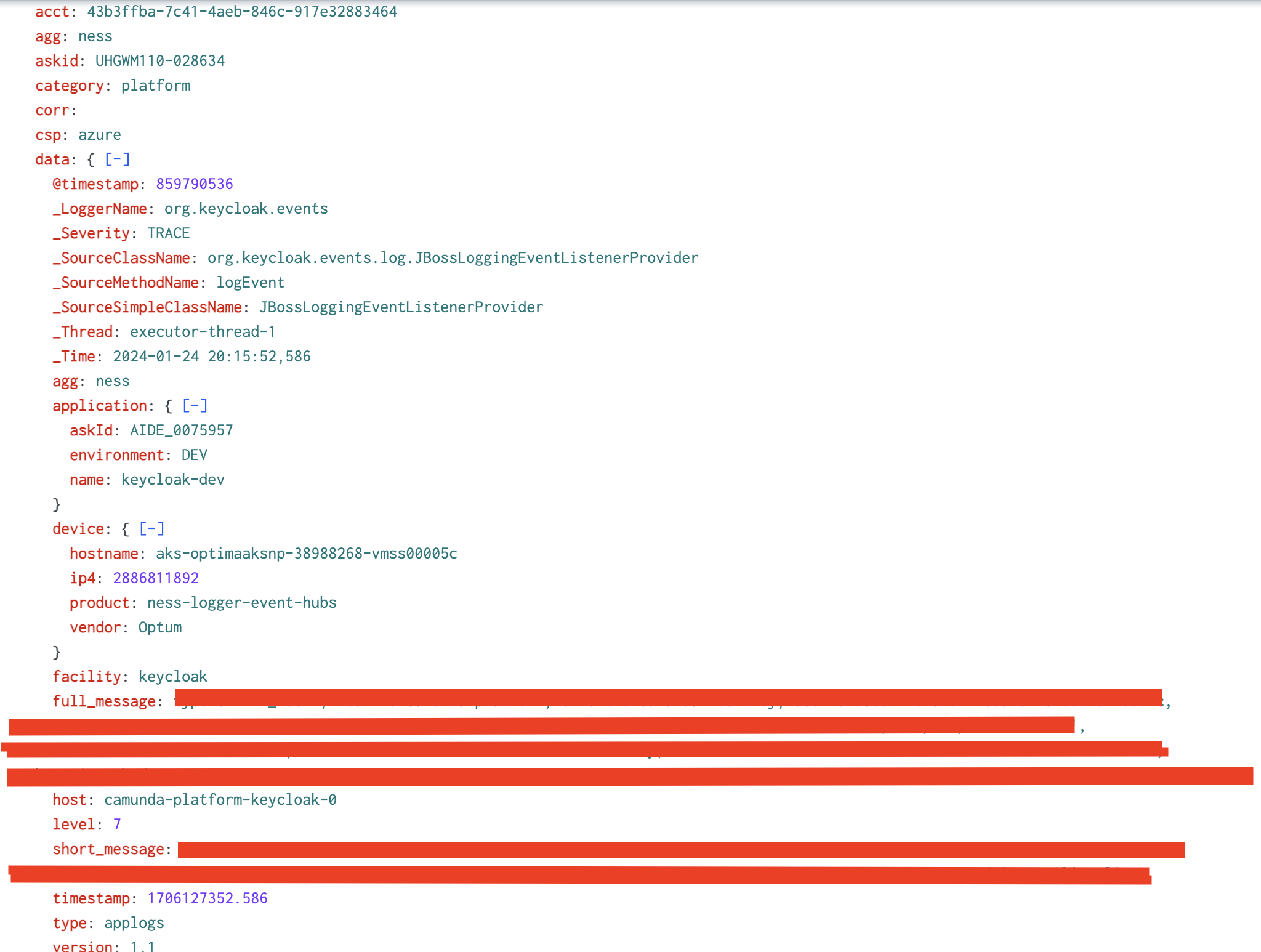
Sample Log Entry in Ness