Camunda 7 & Camunda 8 Comparison
By Komal Chauhan, created on 24th Feb 2023.
Overview
Camunda Platform 8 seems quite familiar to Camunda Platform 7 users. Operate is equivalent to Cockpit. There’s a new Tasklist which is also helpfully called Tasklist, and for those using Optimize, it is compatible with both Camunda Platform 8 and Camunda Platform 7, so no change there. Desktop Modeler now also supports modeling for both versions of Camunda.
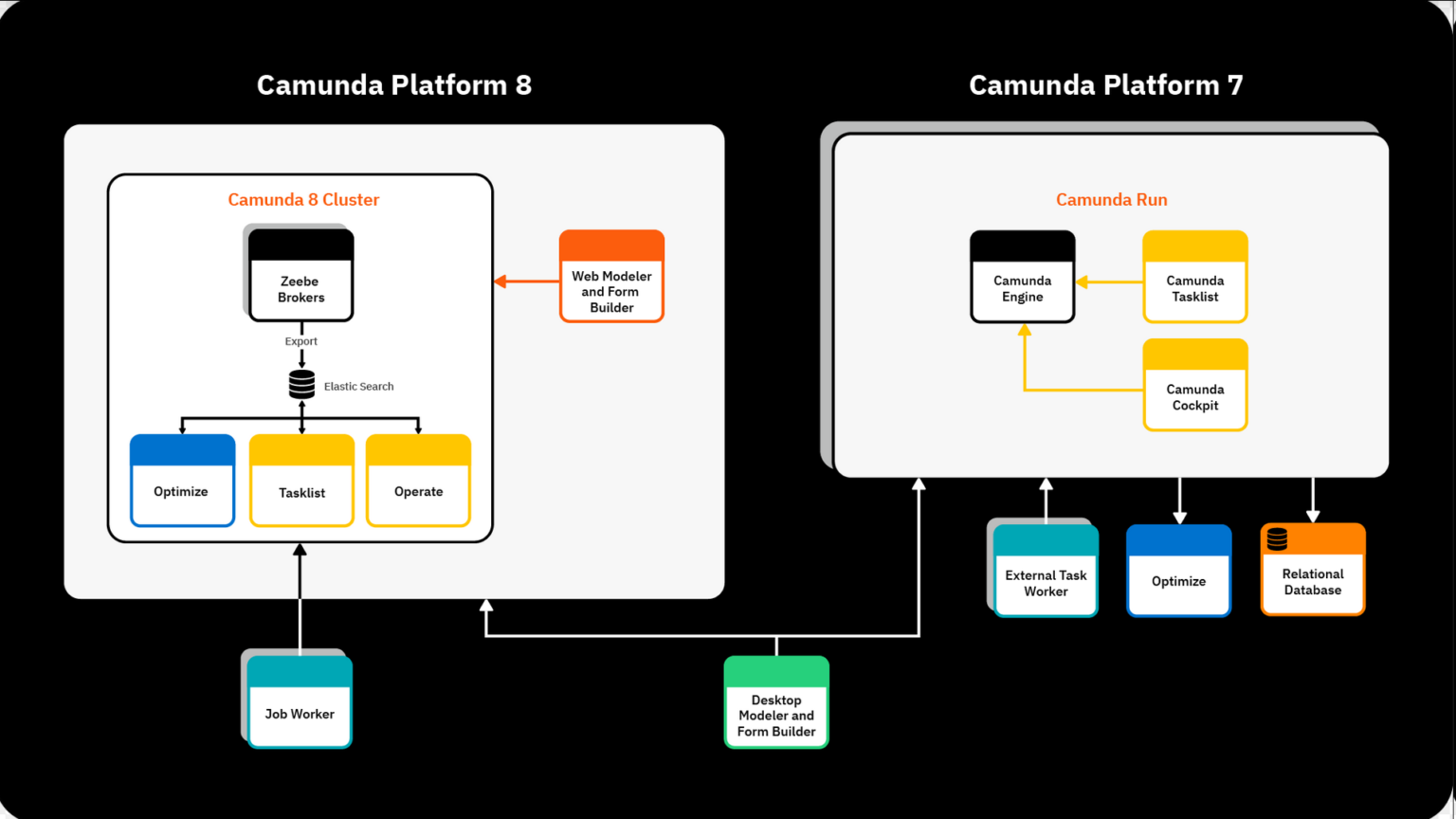
The use case for both platforms is exactly the same: orchestrating systems, services, and people by executing a predefined BPMN 2.0 process model.
The differences between Camunda Platform 7 and Camunda Platform 8 aren’t about the use cases, but are in the technical implementation of the underlying engines.
5 Key Improvements of Camunda Platform 8
Here are the most prominent improvements of Camunda Platform 8 over Camunda Platform 7. In general, the changes can be grouped into the following categories:
- Architecture: Which now allows for true clustering, resilience, horizontal scalability, and geographic redundancy.
- Installation: As Camunda Platform 8 runs on a Kubernetes cluster and automatically has all the tools you need.
- Web Modeler: Where modeling for execution and deployment can finally happen all in web-based tooling.
- Connectors: Making it easier to manage integration with external systems.
- Feature improvements: The existing features you love in Camunda Platform 7 have experienced overhauls and improvements.
Let’s go over this in detail.
Clustering
In Camunda Platform 7, the clustering model was to run multiple workflow engine instances and point them to the same relational database. Then, you could add a load balancer upfront to distribute incoming traffic between the nodes. The database was the single point of failure and could become the bottleneck in this architecture.
The Zeebe engine has clustering built-in, and the default recommendation is to always run at least three brokers (a broker is similar to a Camunda Platform 7 workflow engine node) for resilience, as this eliminates any single point of failure.
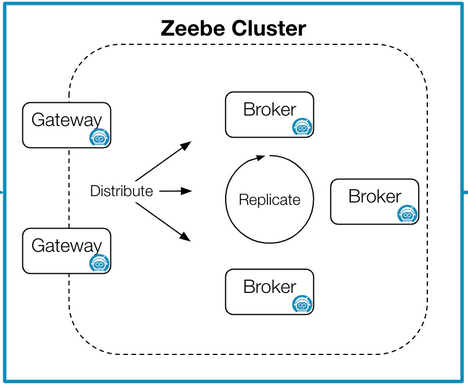
The provided gateway deals with incoming requests and routes them to the right broker, while also caring about load balancing. Brokers store their data as an event stream, locally on disk (as “local” as a disk can be in Kubernetes), and this state is replicated across brokers. This is why there is no need for a relational database as was needed with Camunda Platform 7.
Scaling
The way Camunda Platform 7 scales has one very obvious limitation, the central database. All engines in a cluster have to connect to that same database instance. This limits the throughput of an engine to what the database can handle, so at some point, you’ll reach a hard limit of what a cluster can do.
Camunda Platform 8 does not have this kind of limitation, and the performance continues to scale with each node, which is called horizontal scalability. If you have more brokers running, you can scale for a higher load. It’s pretty easy.
Streamlined deployment and architecture options
For example, deploying a model as part of a Spring Boot project is done by putting your model in the resources folder, while with Camunda Run, it’s best to deploy via the REST API. Mixing up these options can result in the code not running, or deployments being lost or overwritten.
With Camunda Platform 8, we simplified things massively. We have a single method for running and deploying processes, and a single method for running your code—that is to deploy your model remotely via gRPC or REST, and then run the code externally the same way as we would with the external task pattern.
Web Modeler
Camunda Platform 7 has always had pretty good integration with its web apps, but we’ve always found it challenging to properly integrate Modeler in a way that is a good technical and UX fit. With Camunda Platform 8 being hosted in the cloud, it gives us a lot more flexibility with how we can set up a modeler to better integrate with the process engine because we no longer require the end user to have to tinker around with the settings.
Easy integration with connectors
An orchestrator’s most common job is communicating with external systems. In projects using Camunda, those connections are typically programmed from the ground up by the people building the process solution. But some of this logic ends up being quite generic.
So with Camunda Platform 8, we have the ability to add pre-defined connectors. Camunda will provide some connectors, but the ecosystem shall allow users to build their own connectors to be reused within an organization. Connectors can be added as part of Web Modeler.This will save developers a lot of time and effort when building their processes, while still not restricting what they can do.
Feature improvements like BPMN message buffering
Let’s use BPMN messages as one example of how we can improve core features of the platform with the switch to Camunda Platform 8. The BPMN specification defines messages in a way that a token needs to be ready to receive that message when it is sent.
In Camunda Platform 7, if we send a message and there isn’t a token waiting on a message receive event, that message will fail. While this follows the standard perfectly, but also very impractical in real life. Especially in complex distributed scenarios, we often saw messages overtaking each other, making message receiving with BPMN unnecessarily complex.
With Camunda Platform 8, introducing message buffering. Messages now have a time to live—so we can send messages whenever we want, and it will wait in a queue until the message can be delivered.
References
- Camunda Official Blog: https://camunda.com/blog/2022/04/camunda-platform-8-for-camunda-platform-7-users-what-you-need-to-know/
- External Resource: https://blog.viadee.de/en/camunda-8-camunda-7-differences