AuthPass Integration in RuleCraft
- AuthPass is used to manage user authentication and authorization in RuleCraft.
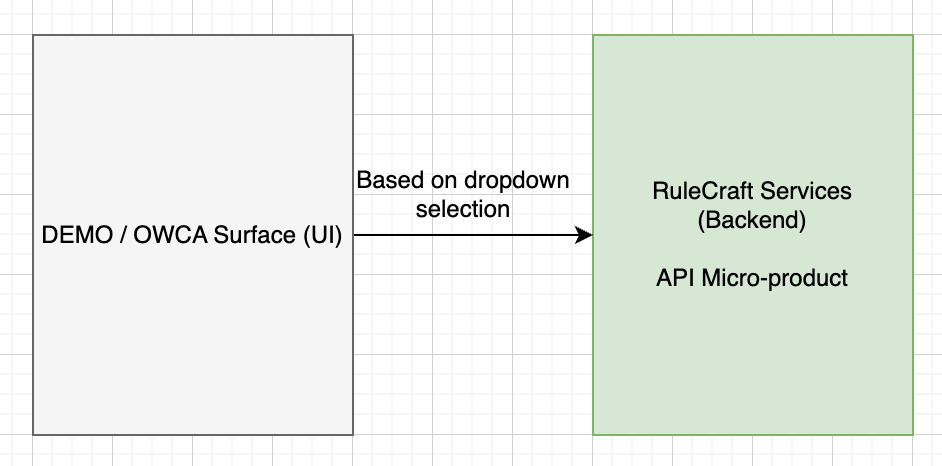
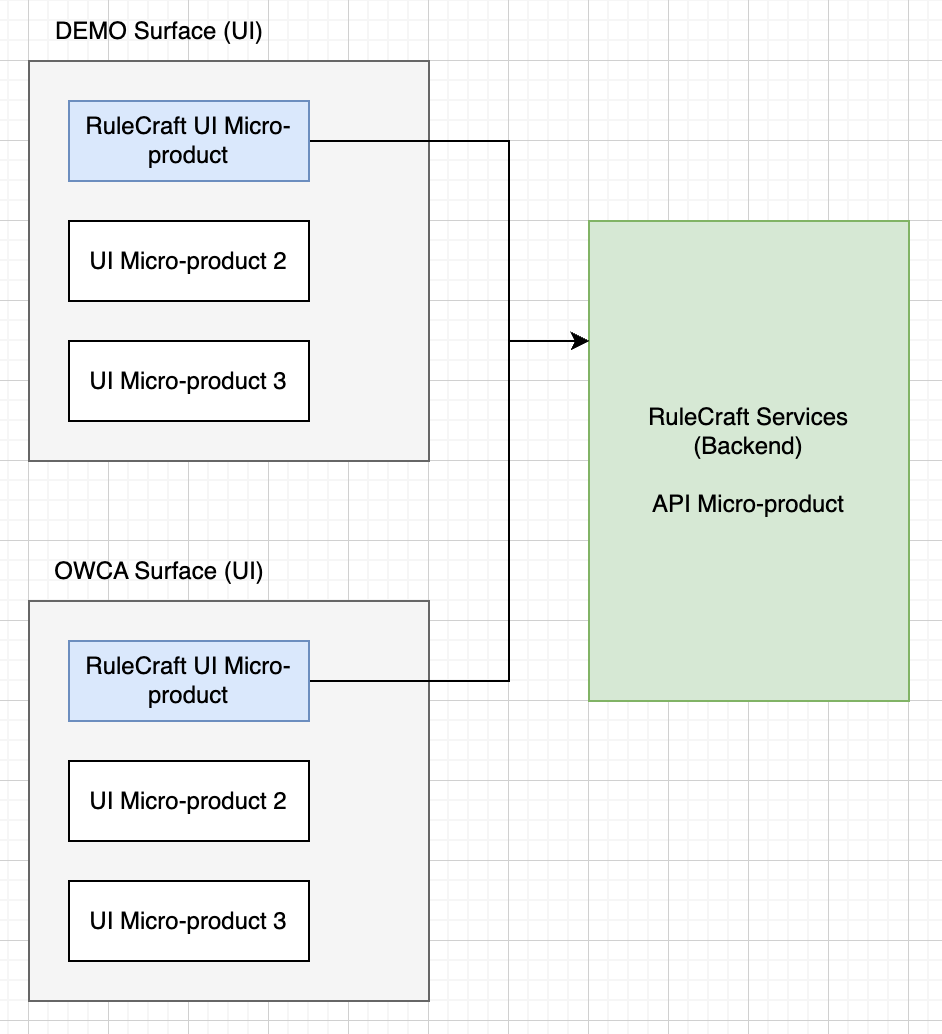
Micro-product and Surface
- Micro-product: Represents the foundational UI code where individual UI elements are developed. This code is packaged as a reusable module but is not directly deployed as an application.
- Surface Application: Acts as the host for the Micro Product, integrating the packaged UI code into a deployable application or platform. One surface application can host multiple micro-products, allowing for modular development and deployment.
Current State
Future State
RuleCraft UI (Frontend)
- RuleCraft UI utilizes Pattern 5 - Recommended way for integrating AuthPass
- More info on Pattern 5 can be found here: Pattern 5 - Auth-lib used to manage IDP and PSP tokens - Recommended
Flow Diagram of RuleCraft UI Authorization
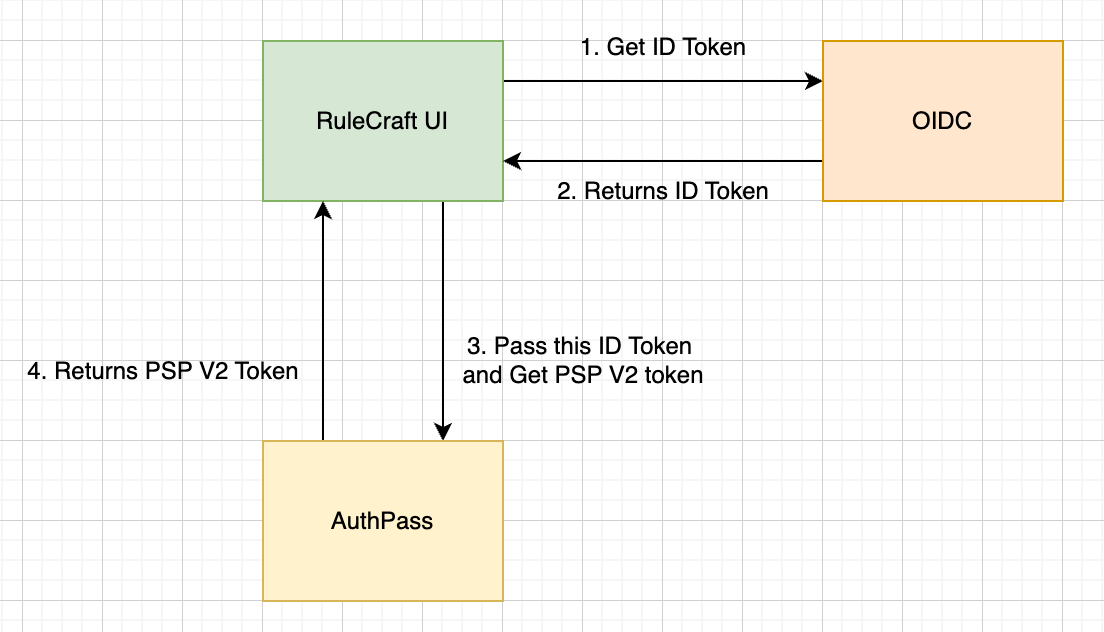
- User Logs in to RuleCraft UI, and it requests an IDP token from OIDC Client.
- OIDC Client authenticates the User and returns IDP token.
- RuleCraft UI uses the IDP token and requests PSP V2 Token from AuthPass.
-
AuthPass validates the IDP token and returns a PSP V2 Token.
-
PSP V2 Token contains user's roles and permissions of the selected Client or Surface (eg. DEMO / OWCA). Based on the roles and permissions, RuleCraft UI will render the UI components accordingly.
OIDC Client Configuration
- OIDC Client of RuleCraft is configured from HCP Console
| RuleCraft Environment | OIDC Client Name | Secure Group used to manage OIDC Client from HCP Console |
|---|---|---|
| Non Prod (Test, Dev, Stage) | Reg3Dev_Rulecraft |
RULCRAFT_SUPER_ADMIN |
| Prod | Reg3_Rulecraft |
RULCRAFT_SUPER_ADMIN |
- (Note: In near time, the OIDC Clients will move from Global Group ownership model to Resource Group based ownership model and the OIDC clients will be available under their respective ASKID Resource Groups)
AuthPass Configuration
- AuthPass is configured from AuthPass portal.
| RuleCraft Environment | AuthPass Environment | AuthPass Portal Link | Tenant Name in AuthPass for Rulecraft Surface | Secure Group required to access RulecraftSurface Tenant |
|---|---|---|---|---|
| Test | Stage | https://authpass-stage.optumrx.com/ | RulecraftSurface |
RULCRAFT_PLATFORM_SURFACE |
| Dev | Stage | https://authpass-stage.optumrx.com/ | RulecraftSurface |
RULCRAFT_PLATFORM_SURFACE |
| Stage | Stage | https://authpass-stage.optumrx.com/ | RulecraftSurface |
RULCRAFT_PLATFORM_SURFACE |
| Prod | Prod | https://authpass.optumrx.com/ | RulecraftSurface |
RULCRAFT_PLATFORM_SURFACE |
Environments
| Rulecraft Environment | OIDC Client | AuthPass Tenant (Env - TenantName) |
|---|---|---|
| Test | Reg3Dev_Rulecraft |
Stage AuthPass - RulecraftSurface |
| Dev | Reg3Dev_Rulecraft |
Stage AuthPass - RulecraftSurface |
| Stage | Reg3Dev_Rulecraft |
Stage AuthPass - RulecraftSurface |
| Prod | Reg3_Rulecraft |
Prod AuthPass - RulecraftSurface |
Configurations in UI code for a Surface
Below 4 values are required to be configured in RuleCraft UI code to integrate with AuthPass and OIDC Client: - OIDC Client Id - OIDC Client Secret - AuthPass Client Id - AuthPass Client Secret
For Rulecraft Surface
- OIDC Client Id:
- Configured in environment specific
.envfile. - Env variable:
NEXT_PUBLIC_PING_FED_CLIENT_ID_DEMO - Value is provided in the
.envitself.
- Configured in environment specific
- OIDC Client Secret:
- Configured in
Dockerfilefile. - Env variable:
NEXT_PUBLIC_PING_FED_CLIENT_SECRET_DEMO - Value of Secret will be fetched from Jenkins Credentials during building the application.
- Note: This secret value stored in Jenkins Credentials are stored in Base64 encoded format.
- Configured in
- AuthPass Client Id:
- Configured in environment specific
.envfile. - Env variable:
NEXT_PUBLIC_AUTHPASS_CLIENT_ID_DEMO - Value is provided in the
.envitself.
- Configured in environment specific
- AuthPass Client Secret:
- Configured in
Dockerfilefile. - Env variable:
NEXT_PUBLIC_AUTHPASS_CLIENT_SECRET_DEMO - Value of Secret will be fetched from Jenkins Credentials during building the application.
- Note: This secret value stored in Jenkins Credentials are stored in Base64 encoded format.
- Configured in
For OWCA Surface
- OIDC Client Id:
- Configured in environment specific
.envfile. - Env variable:
NEXT_PUBLIC_PING_FED_CLIENT_ID_OWCA - Value is provided in the
.envitself.
- Configured in environment specific
- OIDC Client Secret:
- Configured in
Dockerfilefile. - Env variable:
NEXT_PUBLIC_PING_FED_CLIENT_SECRET_OWCA - Value of Secret will be fetched from Jenkins Credentials during building the application.
- Note: This secret value stored in Jenkins Credentials are stored in Base64 encoded format.
- Configured in
- AuthPass Client Id:
- Configured in environment specific
.envfile. - Env variable:
NEXT_PUBLIC_AUTHPASS_CLIENT_ID_OWCA - Value is provided in the
.envitself.
- Configured in environment specific
- AuthPass Client Secret:
- Configured in
Dockerfilefile. - Env variable:
NEXT_PUBLIC_AUTHPASS_CLIENT_SECRET_OWCA - Value of Secret will be fetched from Jenkins Credentials during building the application.
- Note: This secret value stored in Jenkins Credentials are stored in Base64 encoded format.
- Configured in
RuleCraft Services (Backend)
- Rulecraft Services receives PSP V2 Token from RuleCraft UI, and uses that token to authorize the user.
Configurations in Service code for a Micro-product
-
RuleCraft Services is a Micro-product backend application. Hence, it is configured with the credentials of Rulecraft Micro-product.
-
AuthPass SDK dependency added in
pom.xml -
AuthPassConfigfile is used to configure AuthPass properties in RuleCraft Services.@PostConstruct public void init() { AuthpassSDKConfig authpassSDKConfig = AuthpassSDKConfig.builder() .application(AuthpassSDKConfig.Application.builder() .env(applicationProperties.getSecurity().getAuthpass().getRulecraftMp().getEnv()) .clientID(applicationProperties.getSecurity().getAuthpass().getRulecraftMp().getClientId()) .clientSecret(applicationProperties.getSecurity().getAuthpass().getRulecraftMp().getClientSecret()) .dacRolesCacheTimeInSec(DEFAULT_TIME_IN_SECONDS) .personaPermissionsCacheTimeInSec(DEFAULT_TIME_IN_SECONDS) .build() ) .memoryCache(AuthpassSDKConfig.MemoryCache.builder() .name("authpass-sdk-cache") .entryCapacity(1000) .build() ) .build(); try { authpassSDK.init(authpassSDKConfig); } catch (Exception e) { throw new BaseException("Failed to initialize AuthPass SDK", e); } } -
getClaimsFromPSPTokenmethod used to validate PSP V2 Token and get the claims.PspTokenServiceis coming fromauthpass-sdkdependency.
Rulecraft Micro-product and Rulecraft Surface in AuthPass
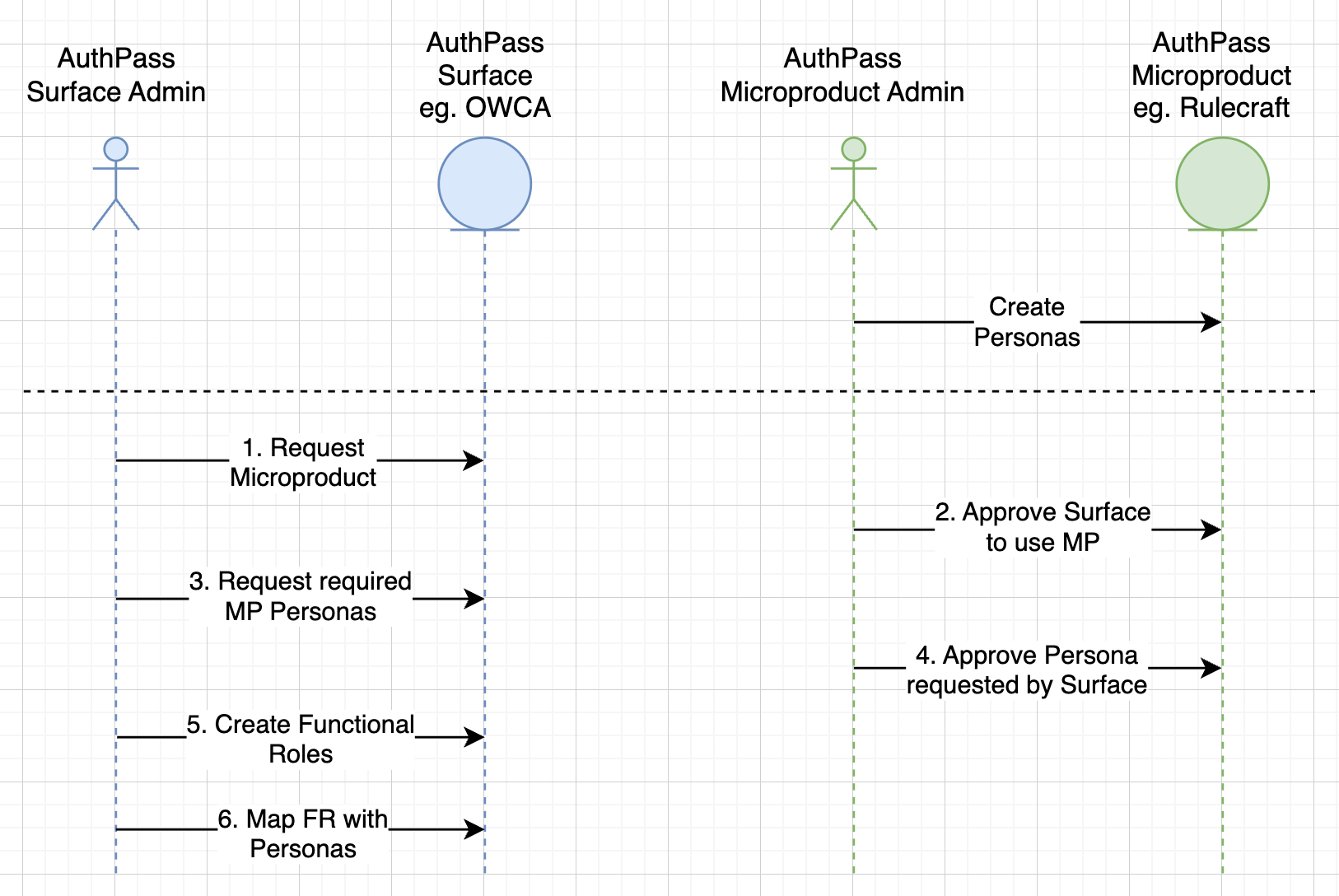
- Micro-product Persona: Persona is a representation of access / permission. It defines the access levels and permissions for that micro-product. Based on the Persona access, UI elements are rendered in the RuleCraft UI.
- Surface Functional Role: Functional Role is a representation of a Secure Group at the surface level. Surface Application shall map the Functional Role with Micro-product Persona.
Rulecraft Functional Role and Persona mapping
- In the below Sheet link, you can find the mapping of Rulecraft Surface Functional Roles with Rulecraft Micro-product Personas.
- This mapping is used to determine which Persona should be assigned to a user based on their Functional Role in the Surface Application.
- Sheet / Excel Link: Link
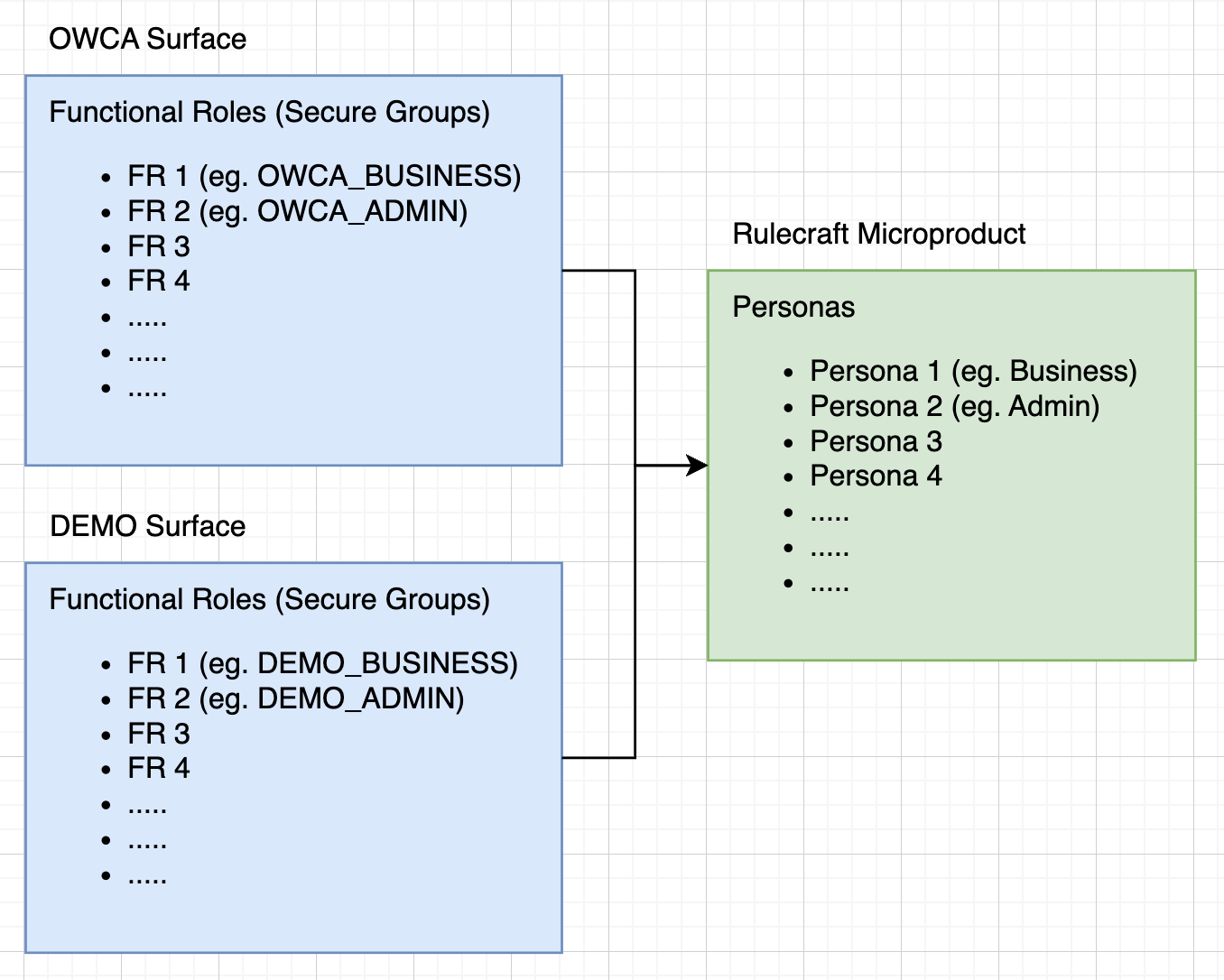
Flow Diagram of Surface requesting for Micro-product and mapping Surface Functional Roles with Micro-product Persona.
By Parth Shah, last updated on 18 June 2025.